
What do three flashing LEDs mean on a Cinderella Freedom or Travel toilet?
Three simultaneously flashing LEDs (red, yellow, and green) on a Cinderella Freedom or Travel model indicate a Burner Fan fault. The unit will beep 10 times when the error is first triggered and will continue displaying this pattern until the toilet is reset.
Specific to the Cinderella Freedom and Travel models, the red, yellow and green LEDs on the control panel will all be flashing at the same interval, indicating an issue with the unit's Burner Fan. The unit will also beep 10 times when the error is first triggered. This pattern will continue until the unit is reset. After resetting, the error will only be triggered again once a new incineration is started and the problem still exists.

The Comfort and Freedom models are equipped with an LCD display that provides detailed error messages, while the Travel models feature a unique control panel without an LCD display.
How to fix the Burner Fan error on a Cinderella Freedom or Travel toilet
Follow these steps in order to resolve the Burner Fan fault. Work through them sequentially — do not skip ahead to hardware inspection before completing the earlier steps:
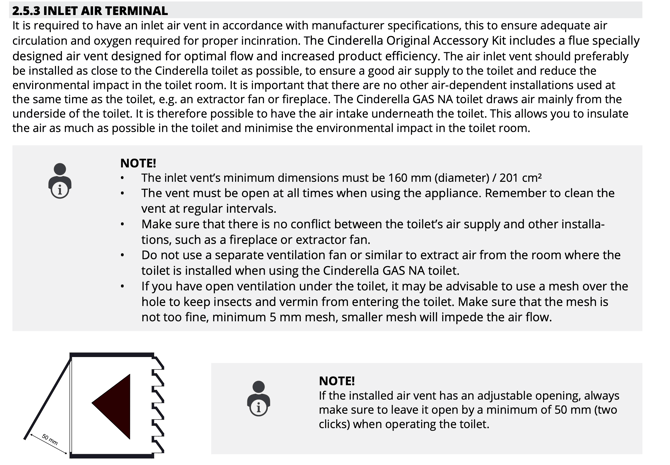
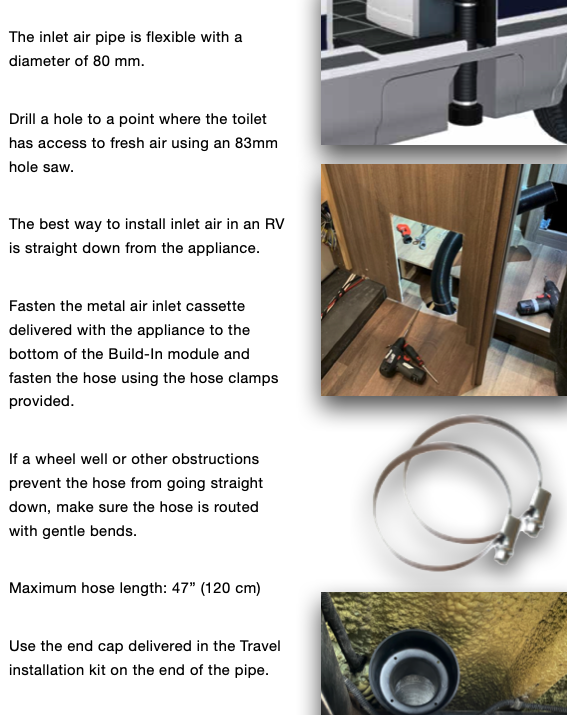
- Check that the fresh air intake is clear of obstructions and is installed to specification. Lack of fresh air can cause the burner fan to melt from overheating and will void warranty.
Cinderella Freedom Intake Specifications:
Cinderella Travel Intake Specifications:
- Reset the toilet by holding down the Start button for approximately 8 seconds until you hear a long beep. Once reset, open and close the lid, then run a dry incineration cycle (no liner or waste needed) to confirm the error has cleared.
- If the error persists, have your local authorized Cinderella dealer or qualified technician remove the rear panel and inspect the burner fan for debris, build-up, or physical defects. Do not attempt to remove the rear panel yourself, as this may void your warranty.
- If the burner fan is found to be defective, replacement burner fans are available for both the Cinderella Travel and Freedom models through an authorized Cinderella dealer.
Still require assistance?
Please fill out the Official Cinderella Support Form for North America and an authorized Cinderella technician will review your case.